Wednesday, 9 October 2013

Remove duplicate rows from a datatable in ASP.NET/C#


In this article I will explain how to remove (delete) duplicate rows (records) from DataTable using DataView in C# .

Namespaces
You will need to import the following namespace.

using System.Data;

Code:C#

DataTable dt = new DataTable();
        dt.Columns.AddRange(new DataColumn[3] { new DataColumn("Id"), new DataColumn("Name"), new DataColumn("Country") });
        dt.Rows.Add(1, "Raja Durai", "United States");
        dt.Rows.Add(2, "Raja", "United States");
        dt.Rows.Add(3, "Durai", "India");
        dt.Rows.Add(4, "S.Raja Durai", "India");
        dt.Rows.Add(4, "S.Raja Durai ", "India");
        dt.Rows.Add(4, "S.Raja Durai ", "India");
dt = dt.DefaultView.ToTable(true, "Id", "Name", "Country");

How to get File size in ASP.NET/C#


I want to share with you how to get the file size in asp.net. Its very simple...

Code:C#

You will need to import the following namespace.
Using System.IO;

string sMyFileName = "~/rajadurai/raja.jpg";

FileInfo finfo = new FileInfo(Server.MapPath(sMyFileName ));
long FileInBytes = finfo.Length;
long FileInKB = finfo.Length / 1024;
long FileInMB = FileInKB /1024;

lblImgSize.Text="File Size: " + FileInBytes.ToString() +" bytes (" + FileInMB.ToString() + " MB)";

Tuesday, 30 July 2013

Check Null Value in SQL Server 2005

Below SQL Query is used to Check null Value in SQL Server 2005.

Syntax

IFNULL(ColumnName,0)

Example

select (case when ISNULL((Select sum(Amount) From Payment B Where B.Purchase_RefID=Purchase.Purchase_RefID  and Status in('Active')),'0') <>'0' THEN  (Select  sum(Amount)  From Payment B Where B.Purchase_RefID=Purchase.Purchase_RefID  and Status in('Active')) else '0' end ) as PaidAmount

Designing a Sub Report inside RDLC Report

  1. Create Report 1 , this is your main report.
  2. Create Report 2 , this will act as subreport.
  3. Now open report 1 and from toolbox drag the subreport control to this main report.
  4. Then Right click on the subreport control and configure it to Point to the Report 2.
  5. Configure the Parameter For subreport , if you have to pass any paramter.

SQL SERVER – CASE Statement/Expression Examples


CASE expressions can be used in SQL anywhere an expression can be used. Example of where CASE expressions can be used include in the SELECT list, WHERE clauses, HAVING clauses, IN lists, DELETE and UPDATE statements, and inside of built-in functions.

Syntax:
CASE expression
WHEN expression1 THEN expression1
[[WHEN expression2 THEN expression2] [...]]
[ELSE expressionN]
END

Example:
DECLARE @Test INT
SET
@Test = 3
SELECT
CASE @Test
WHEN 1 THEN 'First'
WHEN 2 THEN 'Second'
WHEN 3 THEN 'Third'
ELSE 'Other'
END

Check NULL Value in RDLC Report Viewer and Set Value as ' 0 '


In The Report viewer select table fields and select Expression of Table fields

and Write Expression as Follows


=IIf(IsNothing(Fields!TextBox1.Value),"0",Fields!TextBox1.Value)

Sunday, 30 June 2013

MySQL Remote Connection


1. Open Your MySQL Application and select MySQL database.  Then Select USER table.


2. Right Click user Table And Click View Data


3. Then Add another row in table (Given Below).


A)    localhost row always will be there.
B)     The second row %,  is not there then create manually like the same value in localhost row
 
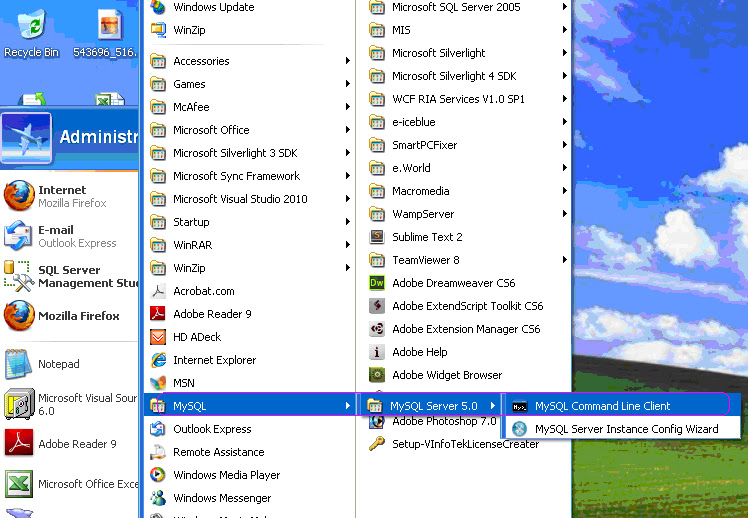
4. Then Click Startà MySQLà MySQL server 5.0 àMySQL Comment Line Client


5. Now “MySQL Comment Line Client “Appeared

6. in this comment box, First Type Your MySQL Password and Click ENTER Button
Then Type

 GRANT ALL PRIVILEGES ON *. * TO 'root' @ 'local host' IDENTIFIED BY '123 'WITH GRANT OPTION;”

 and Click ENTER Button.


6. Now this MySQL will be connected from other machines.