Sunday, 30 June 2013

MySQL Remote Connection


1. Open Your MySQL Application and select MySQL database.  Then Select USER table.


2. Right Click user Table And Click View Data


3. Then Add another row in table (Given Below).


A)    localhost row always will be there.
B)     The second row %,  is not there then create manually like the same value in localhost row
 
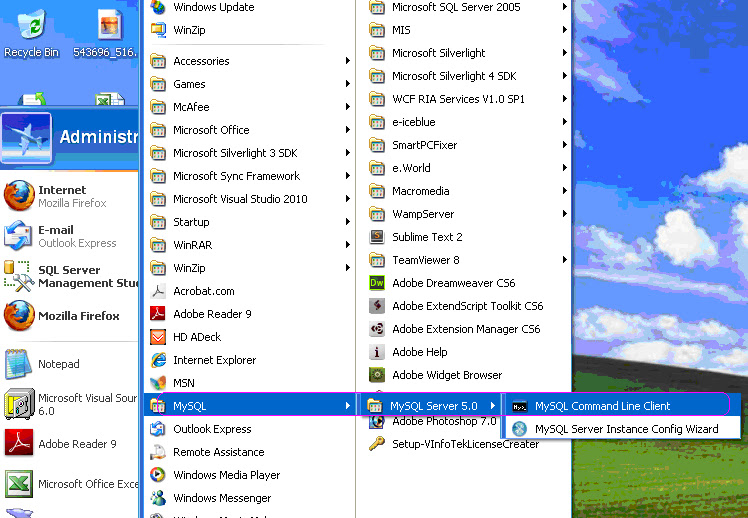
4. Then Click Startà MySQLà MySQL server 5.0 àMySQL Comment Line Client


5. Now “MySQL Comment Line Client “Appeared

6. in this comment box, First Type Your MySQL Password and Click ENTER Button
Then Type

 “GRANT ALL PRIVILEGES ON *. * TO 'root' @ 'local host' IDENTIFIED BY '123 'WITH GRANT OPTION;”

 and Click ENTER Button.


6. Now this MySQL will be connected from other machines.


Wednesday, 6 March 2013

Gridview MergeRows in asp.net

Give the below query in aspx page 


<asp:GridView ID="gvwRaja" runat="server"
        onprerender="gvwRaja_PreRender" onrowdatabound="gvwRaja_RowDataBound"
        BackColor="#DEBA84" BorderColor="#DEBA84" BorderStyle="None" BorderWidth="1px"
        CellPadding="3" CellSpacing="2">
      <FooterStyle BackColor="#F7DFB5" ForeColor="#8C4510" />
      <HeaderStyle BackColor="#A55129" Font-Bold="True" ForeColor="White" />
      <PagerStyle ForeColor="#8C4510" HorizontalAlign="Center" />
      <RowStyle BackColor="#FFF7E7" ForeColor="#8C4510" />
      <SelectedRowStyle BackColor="#738A9C" Font-Bold="True" ForeColor="White" />
      <SortedAscendingCellStyle BackColor="#FFF1D4" />
      <SortedAscendingHeaderStyle BackColor="#B95C30" />
      <SortedDescendingCellStyle BackColor="#F1E5CE" />
      <SortedDescendingHeaderStyle BackColor="#93451F" />
    </asp:GridView>

Then give the below queryin aspx.cs page

protected void Page_Load(object sender, EventArgs e)

    {
        if (!IsPostBack)
            CreateTable();
    }
    private void CreateTable()
    {
        DataTable dt = new DataTable();
        dt.Columns.Add("CountryId");
        dt.Columns.Add("CountryName");
        dt.Columns.Add("State");

        dt.Rows.Add("1", "India", "TamilNadu");
        dt.Rows.Add("1", "India", "Delhi");
        dt.Rows.Add("1", "India", "Andhra Pradesh");
        dt.Rows.Add("1", "India", "Maharashtra");
        dt.Rows.Add("2", "US", "Alabama");
        dt.Rows.Add("2", "US", "Hawaii");
        dt.Rows.Add("3", "UK", "United Kingdom");

        gvwRaja.DataSource = dt;
        gvwRaja.DataBind();
    }


  protected void gvwRaja_PreRender(object sender, EventArgs e)
    {
        Class2.MergeRows(gvwRaja);
    }

Then create a class file nane same as (Class2) 
Then give the query in class2 page 


public static void MergeRows(GridView gridView)
    {
        for (int rowIndex = gridView.Rows.Count - 2; rowIndex >= 0; rowIndex--)
        {
            GridViewRow row = gridView.Rows[rowIndex];
            GridViewRow previousRow = gridView.Rows[rowIndex + 1];

            for (int cellIndex = 0; cellIndex < row.Cells.Count; cellIndex++)
            {
                if (row.Cells[cellIndex].Text == previousRow.Cells[cellIndex].Text)
                {
                    row.Cells[cellIndex].RowSpan = previousRow.Cells[cellIndex].RowSpan < 2 ? 2 : previousRow.Cells[cellIndex].RowSpan + 1;
                    previousRow.Cells[cellIndex].Visible = false;
                }
            }
        }
    }


 Now run Your Program Your OutPut Looks Like Given Below
 

Url Rewrite in Asp.net


3 Different places need to modify in Web Configuration


Modify the above detail in web configuration

       Then set the link to the aspx page


Add   ” Intelligencia.UrlRewriter.dll “    in our project bin folder
 Then right click on the project and select Property Pages.


    When click the Property Pages a window appeared.  In this window we change   “Home.aspx to Home”


     Then click apply and click ok.
 

Wednesday, 20 February 2013

How to export DataTable into Excel file in ASP.NET

There is a one simple function written below, which takes datatable as a parameter and give it popup to user to save the file as an excel file.
Copy and paste file in your code, and call this function on Event where it required

using System;
using System.Data;
using System.Web.UI.WebControls;
using System.IO;
using System.Web.UI;
protected void Page_Load(object sender, EventArgs e)
    {
        DataTable dt = new DataTable();
        dt.Columns.Add("Name", typeof(string));
        dt.Columns.Add("Qualification", typeof(string));
        dt.Rows.Add("Raja", "M.B.A");
        dt.Rows.Add("Durai", "M.B.B.S");
        dt.Rows.Add("SRD", "BE");
        ExportToExcel(dt);
    }

public void ExportToExcel(DataTable dt)
    {
        if (dt.Rows.Count > 0)
        {
            string filename = "Raja.xls";
            string excelHeader = "Raja Report";
            System.IO.StringWriter tw = new System.IO.StringWriter();
            System.Web.UI.HtmlTextWriter hw = new System.Web.UI.HtmlTextWriter(tw);
            DataGrid dgGrid = new DataGrid();
            dgGrid.DataSource = dt;
            dgGrid.DataBind();
            // Report Header
            hw.WriteLine("<b><u><font size='3'> " + excelHeader + " </font></u></b>");
            //Get the HTML for the control.
            dgGrid.RenderControl(hw);
            //Write the HTML back to the browser.          
            Response.ContentType = "application/vnd.ms-excel";
            Response.AppendHeader("Content-Disposition", "attachment; filename=" + filename + "");
            this.EnableViewState = false;
            Response.Write(tw.ToString());
            Response.End();
        }
    }


Export DataTable To MicroSoft Word In C#

we have Export the DataTable as a Word Format. I hope the below code is useful to us.

using System;
using System.Data;
using System.Web.UI.WebControls;
using System.IO;
using System.Web.UI;

protected void Page_Load(object sender, EventArgs e)
    {
        ExportToWord();
    }

protected void ExportToWord()
    {      
        DataTable dt = new DataTable();
        dt.Columns.Add("Name", typeof(string));
        dt.Columns.Add("Qualification", typeof(string));
        dt.Rows.Add("Raja", "M.B.A");
        dt.Rows.Add("Durai", "M.B.B.S");
        dt.Rows.Add("SRD", "BE");
        //Create a dummy GridView
        GridView GridView1 = new GridView();
        GridView1.AllowPaging = false;
        GridView1.DataSource = dt;
        GridView1.DataBind();
        Response.Clear();
        Response.Buffer = true;
        Response.AddHeader("content-disposition",
        "attachment;filename=DataTable.doc");
        Response.Charset = "";
        Response.ContentType = "application/vnd.ms-word ";
        StringWriter sw = new StringWriter();
        HtmlTextWriter hw = new HtmlTextWriter(sw);
        GridView1.RenderControl(hw);
        Response.Output.Write(sw.ToString());
        Response.Flush();
        Response.End();
    }
 

Friday, 15 February 2013

Send Table Format Mail Using C#


DataTable dt = new DataTable();
dt.Columns.Add("Name", typeof(string));
dt.Columns.Add("Place", typeof(string));
dt.Rows.Add(“Raja”,”KanyaKumari”);
dt.Rows.Add(“Durai”,”KanyaKumari”);

string str1 = "", str2 = "", str3 = "";
str2 = "<table border =1 bordercolor=black cellspacing=0 cellpadding=0 >";

str2 += "<tr><td width=100px align=center><b>Name</b><b></td><td width=100px align=center><b>Place</b></td>>/tr>”;

foreach (DataRow r in dt.Rows)
{
  str2 += "<tr><td> <font color=blue><i><center>" + r[0].ToString() + "</center></i></font></td>";
  str2 += "<td><font color=blue><i><center>" + r[1].ToString() + "</center></i></font></td></tr>";
}

try
  {
   MailMessage mailmsg = new MailMessage();
   mailmsg.From = new MailAddress("raja30march90@Gmail.com");
   mailmsg.To.Add(raja30march90@Gmail.com);
   mailmsg.CC.Add(raja30march90@Gmail.com);
   mailmsg.Subject = "V-EnerTek Expense WorkAllocated";
   mailmsg.IsBodyHtml = true;

   str1 = "<html><body> <br/>" +
        "<br/><b>" + “Example”</b> <br/>" +
                               "<br/>" +
         "Name: " + “Raja Durai+
                              "<br/>";


   str3 = "<br/>" +
     "With Regards,<br/>" + “Raja.S” + "<br/>" +
                              "<br/>" +
                              "<br/>" +
                              "<br/>" +
"</body></html>";
mailmsg.Body = str1.ToString() + " " + str2.ToString() + " " + str3.ToString();
  SmtpClient smtpclt = new SmtpClient();
  smtpclt.Host = "127.0.0.1";
  smtpclt.Send(mailmsg);

}